Desktop Speakers: A Compact Audio Upgrade for a Cleaner Desk Setup
This article contains affiliate links. As an Amazon Associate I earn from qualifying purchases.
A desk setup can be perfectly usable and still feel like something is missing. The monitor looks good, the keyboard is where you want it, and everything is finally tidy—then a video starts playing and the built-in audio reminds you that “good enough” can sound pretty thin.
That is exactly where compact desktop speakers make sense. They do not need to dominate the desk or turn a work corner into a full entertainment system. Sometimes the better upgrade is simply getting clearer stereo sound in a small footprint that fits naturally beside the monitor.

Why Desktop Speakers Can Make a Workstation Feel More Complete
External speakers are one of those desk upgrades that can improve several little moments at once. Music while you work sounds fuller. Videos are easier to enjoy. Calls, tutorials, and casual gaming feel less dependent on whatever tiny speakers happen to be built into the monitor or laptop.
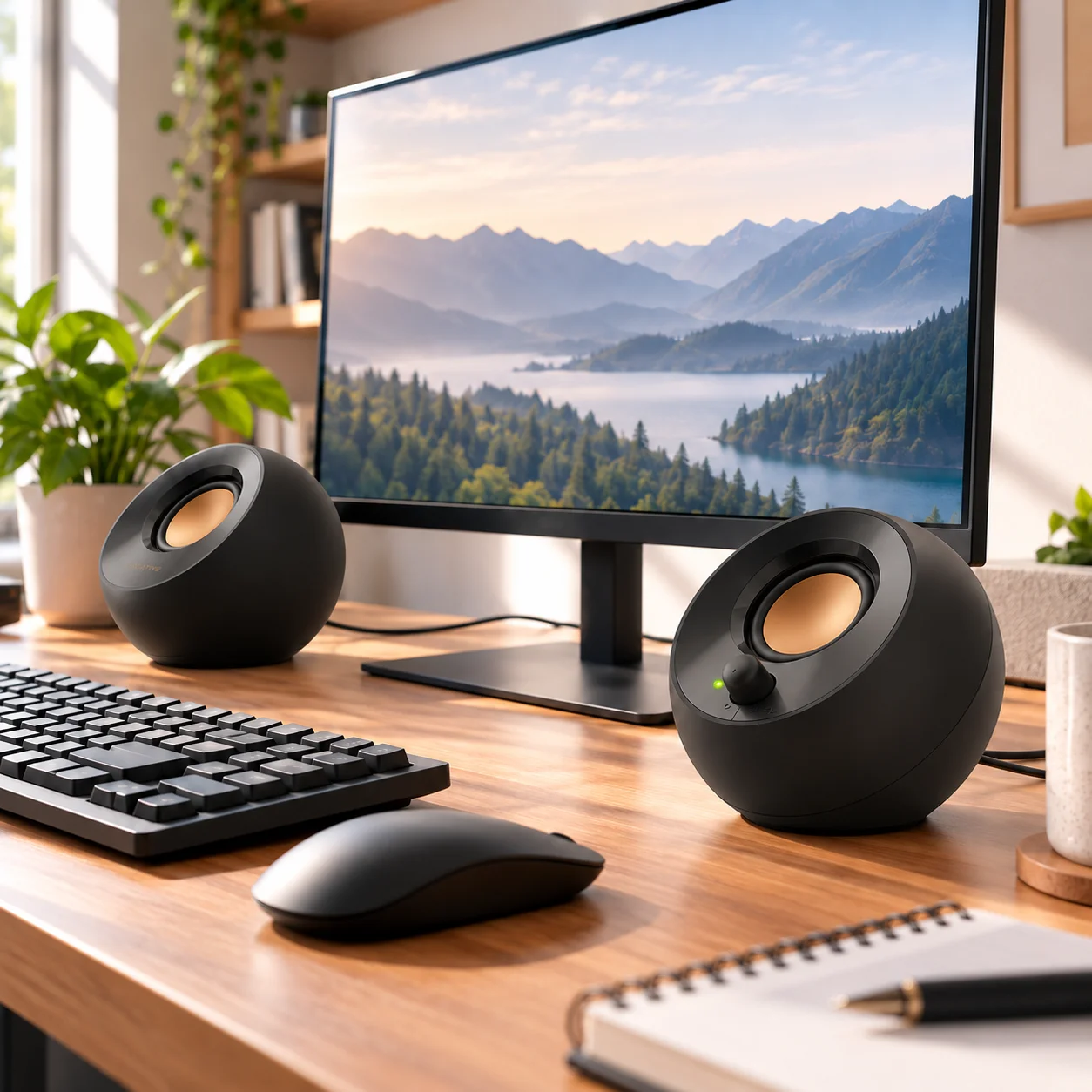
The Creative Pebble 2.0 is especially easy to picture in a compact setup because the pair is small, visually simple, and designed to sit close to a computer rather than take over the room.
What the Creative Pebble 2.0 Actually Offers
Compact 2.0 stereo sound without taking over the desk
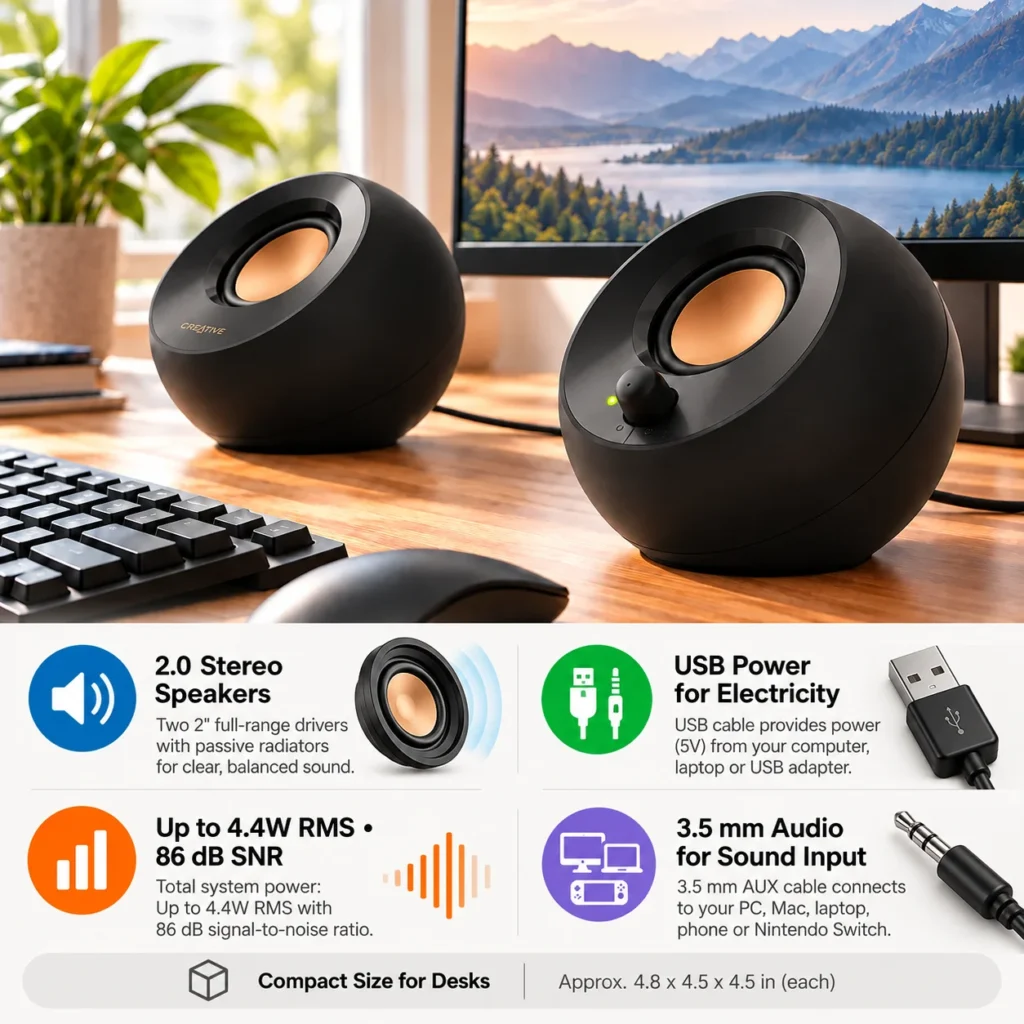
Creative Pebble is a 2.0 stereo speaker system, so you get separate left and right speakers rather than a single mono source. Each speaker uses a 2-inch full-range driver, and the system is rated for up to 4.4W RMS total output.
That number matters less than the role it is designed to fill. These are not giant room speakers. They are personal desktop speakers meant to give a PC or Mac a cleaner, more complete everyday audio setup while using very little desk space.
USB power and 3.5 mm audio keep setup simple
The original Pebble model keeps connectivity intentionally basic: USB provides power, while a 3.5 mm stereo connection carries the audio signal. There is no Bluetooth on this version and no need to pair anything.
That wired approach can actually be a plus on a fixed desk. Once the speakers are connected, there is very little to manage. The right speaker also puts the volume control on the front, so quick adjustments are easy without opening software settings.

45° elevated drivers and passive radiators
The Pebble shape is not only cosmetic. Creative angles the drivers upward at 45°, directing the sound toward the listener instead of firing straight across the desk. The speakers also use passive radiators to add more body to the sound than you might expect from such a compact enclosure.
That does not turn them into bass-heavy speakers with a dedicated subwoofer, but it helps explain why the design works well at close range on a desk.
Where These Speakers Fit Best
These speakers make the most sense on home-office desks, study setups, compact PC stations, or shared spaces where you want better sound without dedicating much room to audio gear.
They are also a good fit for someone who values a clean visual setup. The round design is distinctive without being busy, and the black version blends easily with most monitors, keyboards, and other desk accessories.
What to Check Before You Buy
Wired connectivity versus wireless convenience
The simplicity of the original Pebble is also its main limitation. Audio comes through the 3.5 mm connection and power comes through USB. If you specifically want Bluetooth or a single USB-C cable carrying digital audio and power, you should look at newer models in the Pebble family instead.
For a stationary desktop, though, the basic wired connection is easy to live with and removes the small annoyances of pairing or charging speakers.
Power and bass expectations
With up to 4.4W RMS total system power, this is a personal desktop audio upgrade rather than a high-output speaker system. It is well suited to close-range listening, everyday media, casual music, and general computer use.
If your priority is deep bass, very loud playback, or filling a large room, a system with more power or a separate subwoofer would be a better match.

Who Will Get the Most Value From Them?
Creative Pebble 2.0 is a strong fit for anyone building a clean desk on a reasonable budget and wanting a noticeable step up from basic monitor or laptop sound without adding much visual clutter.
It is especially appealing for work-and-study setups where compact size, easy controls, and simple wired reliability matter more than wireless features.
The Everyday Upgrade Take
Creative Pebble works because it solves a small, familiar desk problem without creating a new one. You get proper left-right desktop audio, a design that barely asks for extra space, and a setup simple enough to forget about once it is connected. It is not trying to be the loudest or most feature-packed speaker system. For a tidy workstation, that restraint is part of the appeal. If your desk needs better everyday audio more than it needs another complicated gadget, Pebble 2.0 is an easy product to understand.
This article contains affiliate links. As an Amazon Associate I earn from qualifying purchases.
Want simple stereo sound without crowding your desk? Check the current Creative Pebble 2.0 details and availability on Amazon.
If you’re refining the rest of your workspace too, browse more practical ideas in our Office Desk Setup collection.
If your phone is usually sitting beside the keyboard, our adjustable phone stand guide is another small desk upgrade that keeps frequently used tech easier to see.