
Gaiatop USB Desk Fan: A Small Breeze That Makes Desk Time Easier
This article contains affiliate links. As an Amazon Associate I earn from qualifying purchases.
The Gaiatop USB desk fan is the kind of thing you start thinking about halfway through a warm workday. Your laptop is open, the to-do list is not getting shorter, and the room feels just stuffy enough to be distracting. Turning on a large fan might be more airflow than you need. Sometimes all you want is a little breeze aimed at you rather than the entire room.

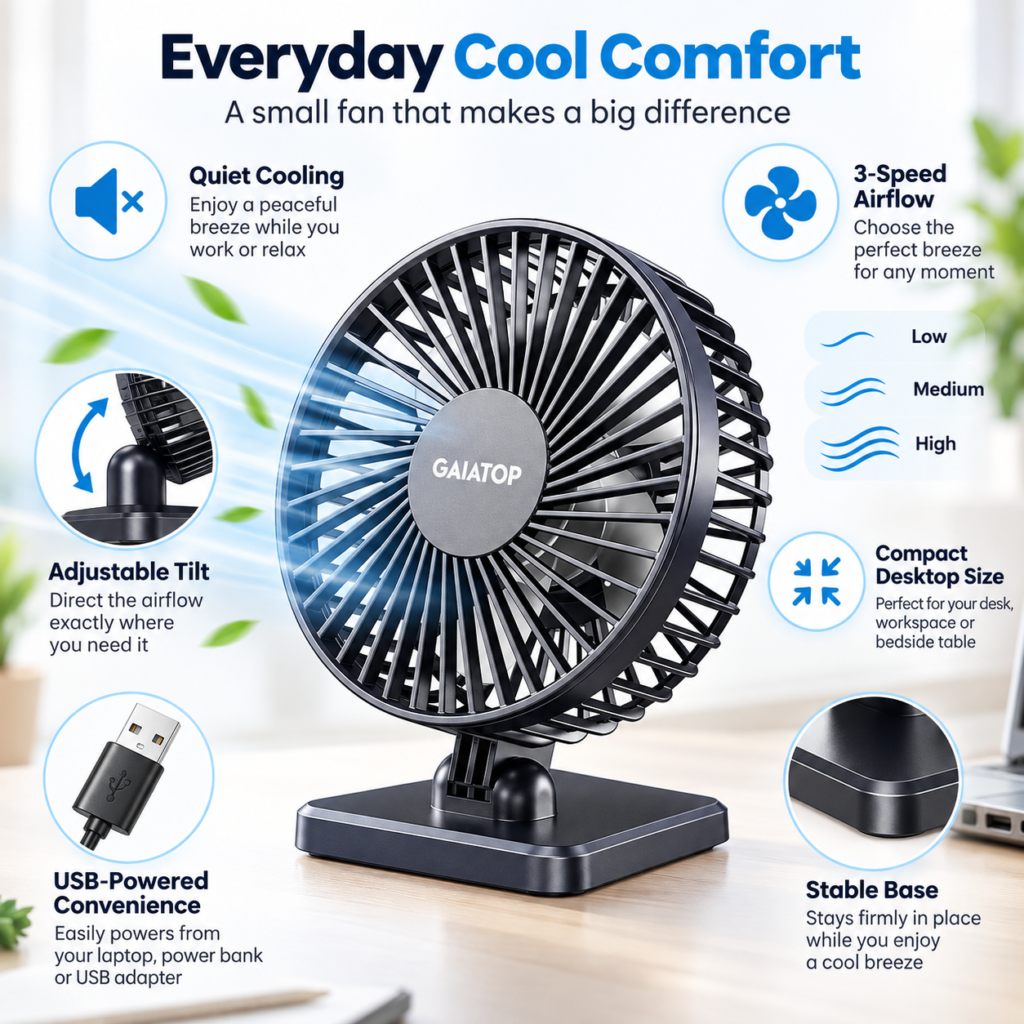
That is the appeal of a small fan on the desk: personal airflow, close at hand, without rearranging the workspace. Gaiatop’s compact USB-powered model brings three speed settings, an adjustable head and a stable tabletop base to that simple job. It is not an air conditioner or a room-cooling solution. It is a practical way to make one seat feel more comfortable while you work, study or take a break.

How the Gaiatop USB Desk Fan Fits Into a Real Workday
At a computer, the best position is often off to one side rather than straight in front of the keyboard. That way, the airflow reaches your face or shoulders without sending every loose note across the desk. The fan’s compact shape also matters here: you can keep it beside a monitor, notebook or coffee mug instead of clearing a whole corner just to make room for it.
The point is not to create a dramatic blast of air. It is to give yourself a nearby option when the room begins to feel uncomfortable, especially during long stretches of focused work. A small fan is also easy to move from a home office to a bedside table when the day is done—as long as there is a USB power source nearby.
Three speeds let you choose the breeze
The Gaiatop fan has low, medium and high settings. Low can make sense when you want some movement in the air but would rather keep papers and lightweight items undisturbed. Medium offers a step up for a warmer afternoon, while high is there when you want a stronger direct breeze. The right setting depends on where the fan sits and how close you are to it; there is no single speed that suits everyone.
The adjustable tilt matters more than it sounds
A desk is rarely a perfectly level stage for comfort. The screen might be raised, the fan might sit below your face, or you might want airflow at your shoulders instead of your eyes. The maker describes a head that tilts up to 30 degrees, which helps direct the breeze instead of requiring you to keep shifting the entire base. That is a small design detail with a very everyday payoff.
What USB Power Changes—and What It Does Not
This is a USB-powered fan, not a rechargeable cordless model. It needs a connected power source while it runs. You could plug it into an appropriate USB port on a computer, a compatible wall adapter or a power bank. That flexibility is useful, but it also means you should plan where the cable will go. A neat desk setup still needs a reachable port and enough cable slack to place the fan where you want it.
There is an upside to the straightforward design: you are not planning your day around an internal battery’s remaining charge. But if you want to carry a fan around the house with nothing attached, this is not the style to buy. The word ‘portable’ describes its small size and ease of moving it, not cordless operation.
Low-noise operation is not the same as silence
Gaiatop describes the model as low-noise. That makes it a reasonable product to consider for a workspace, but any fan still makes some motor and airflow sound, especially at higher speeds. If you are very sensitive to background noise, the most useful expectation is a modest personal breeze—not an invisible, completely silent appliance.
Where a Compact Desk Fan Can Be Useful Beyond the Desk
A bedside table can be another sensible spot when you want air directed toward your pillow rather than the whole room. A shelf next to a reading chair or a small hobby station can work too. The fan is meant for targeted airflow, so its usefulness comes from placing it near the person who needs it. It is less suitable for cooling a large living room or sharing airflow across several people.
The maker also describes a detachable front cover for easier cleaning. That matters over time because desk fans tend to collect dust on the grille and blades. Switch the fan off and disconnect USB power before any cleaning; follow the instructions for the exact model rather than forcing the front cover or getting the motor wet.

What to Check Before Buying the Gaiatop USB Desk Fan
Confirm the color and exact listing variation
The visuals for this article show a dark gray-to-black fan. Before you order, make sure the Amazon page opens the same color and the same compact TF-30-style tabletop model. Similar-looking Gaiatop fans can differ in the shape of the stand, tilt range and power setup. The product photo and selected variation on the live listing should agree with what you expect to receive.
Think about power placement and personal space
Ask yourself three simple questions: where will the fan sit, where will it draw USB power, and will the breeze be aimed at you without bumping your laptop, notes or drink? Those questions matter more to daily satisfaction than buying a fan based on size alone. Keep it on a steady surface, away from loose fabric or objects that could block the grille.
Choose a fan for the job you actually need
If you need a little direct airflow while typing, studying or reading, this category makes sense. If your goal is to reduce the temperature of an entire room, a small desktop fan is not a substitute for ventilation or air conditioning. And if you need cordless use, choose a model that explicitly lists a built-in battery instead.
The Everyday Upgrade Take
A good small upgrade removes one repeat annoyance without introducing a new routine. This Gaiatop fan has a clear purpose: stay within reach, point the airflow toward you and let you choose how much breeze feels right. Its three speeds, adjustable tilt and USB power make sense together when you picture them beside a laptop on an ordinary afternoon.
It will not transform a hot room, and it is not meant to. For a desk, study nook or bedside spot that just needs a little personal airflow, though, it is an uncomplicated option worth comparing with the space and power source you already have.
This article contains affiliate links. As an Amazon Associate I earn from qualifying purchases.
(Paid link) Check the current Gaiatop USB desk fan price and availability on Amazon.
Explore more practical office desk setup ideas for a workspace that feels easier to use.